Advanced Phishing Detection & BEC Protection
Enterprise-grade platform with agent-based monitoring, AI-assisted analysis, and comprehensive MITRE ATT&CK coverage. Protect your organization from sophisticated phishing and business email compromise attacks.
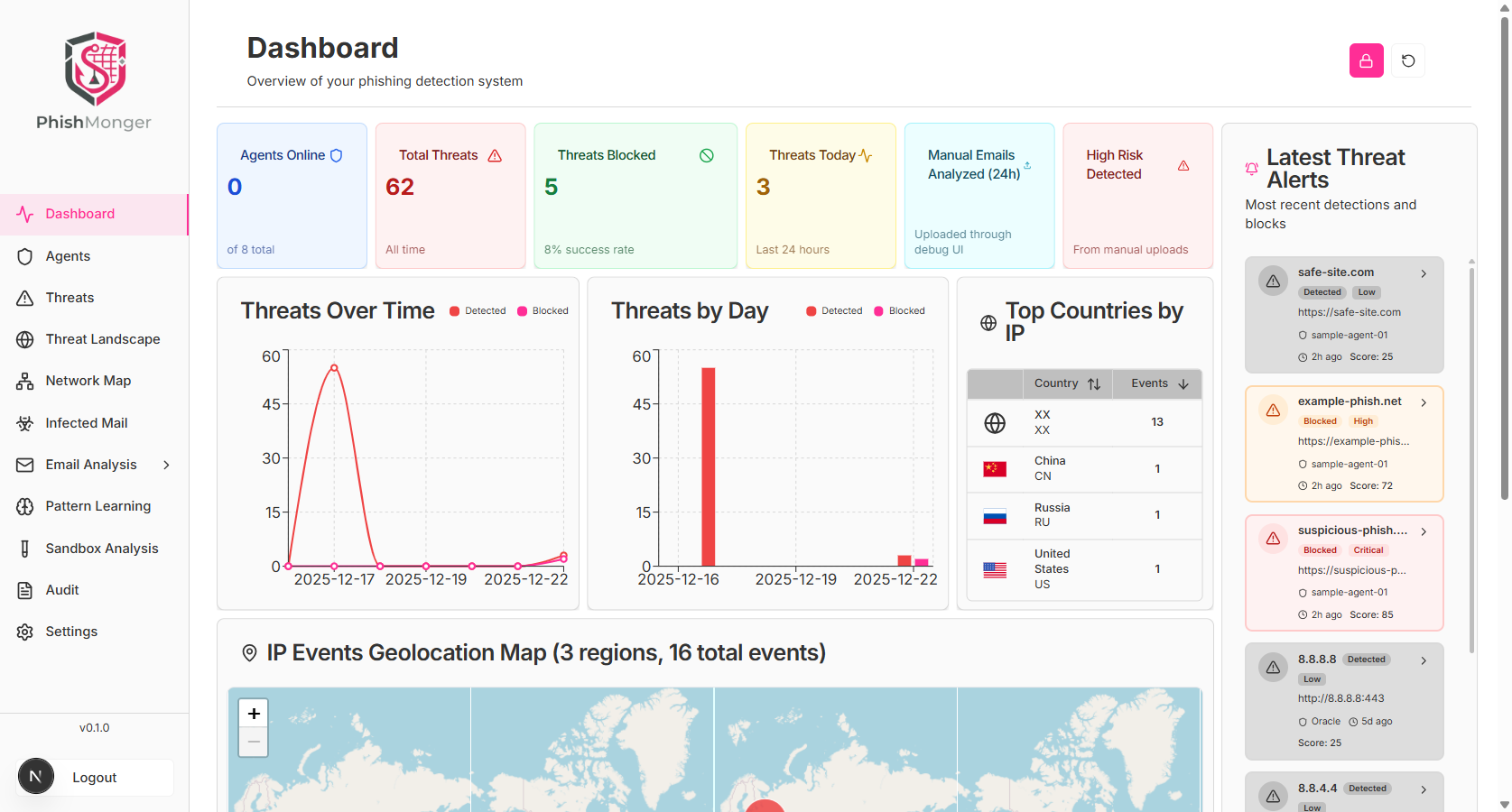
What is PhishMonger?
PhishMonger is a comprehensive cybersecurity platform that combines cross-platform desktop agents, advanced AI analysis, and pattern learning to detect and prevent phishing attacks and business email compromise. Our agent-based architecture provides real-time monitoring of browser and email activity, while our backend platform enables SOC teams to respond quickly to threats.
Key Differentiators
What sets PhishMonger apart from traditional email security solutions
Agent-Based Detection
Cross-platform desktop agents monitor browser and email activity in real-time, providing local-first analysis with zero-trust architecture.
AI-Assisted Analysis
Advanced AI engine analyzes patterns, learns from threats, and provides actionable intelligence for SOC teams and security analysts.
MITRE-Mapped Coverage
Comprehensive MITRE ATT&CK framework mapping ensures detection coverage across tactics and techniques, with continuous improvement.
Simulation-Driven Training
Safe, sandboxed phishing simulation server enables security training without external network access, improving detection readiness.
How It Works
PhishMonger's architecture enables comprehensive threat detection and response
Agent
Desktop agents monitor browser and email activity
Backend
Centralized platform processes and analyzes events
AI
AI engine provides advanced pattern recognition
Dashboard
SOC teams respond with real-time visibility
Trusted by Security Teams
PhishMonger provides enterprise-grade security with privacy-first architecture, comprehensive MITRE ATT&CK coverage, and seamless SOC integration.
MITRE ATT&CK Coverage
Zero-Trust Architecture
SOC 2 Ready
Privacy-First Design
Enterprise-Grade Security
Frequently Asked Questions
What is PhishMonger and how does it detect phishing attacks?
PhishMonger is an enterprise-grade phishing detection platform that uses cross-platform desktop agents to monitor browser and email activity in real-time. The platform combines local-first analysis, AI-powered pattern recognition, and MITRE ATT&CK-aligned detection to identify sophisticated phishing attempts and business email compromise attacks before they impact your organization.
How does PhishMonger differ from traditional email security solutions?
Unlike traditional email security gateways that only inspect emails at the perimeter, PhishMonger uses agent-based monitoring to detect threats at the endpoint level. This provides visibility into browser-based attacks, real-time URL analysis, and behavioral anomaly detection that traditional solutions miss. Additionally, PhishMonger offers comprehensive MITRE ATT&CK coverage and continuous pattern learning.
What is business email compromise (BEC) and how does PhishMonger protect against it?
Business email compromise (BEC) is a sophisticated attack where threat actors impersonate executives or trusted partners to trick employees into transferring funds or sensitive information. PhishMonger detects BEC attacks through email header analysis, behavioral pattern recognition, and AI-powered anomaly detection that identifies suspicious email characteristics and communication patterns.
Does PhishMonger integrate with existing security tools?
Yes, PhishMonger integrates seamlessly with existing security infrastructure including SIEM systems (Wazuh, Splunk, IBM QRadar), email security gateways, and SOC tools. The platform provides RESTful APIs and WebSocket support for real-time event streaming and incident response workflows.
Is PhishMonger suitable for managed service providers (MSPs)?
Yes, PhishMonger offers a comprehensive multi-tenant platform designed specifically for MSPs. The platform includes white-labeling capabilities, hierarchical tenant management, per-tenant licensing, complete data isolation, and revenue enablement tools. Learn more about our MSP platform at /msp.